
Home » Tips and Tricks » MS Excel
Category Archives: MS Excel

How to wind up a company?
How to wind up a company? It is a very important question which a professional must know the answer of.
I am sharing here some useful guide for the procedure and legal requirements to wind up a company. I hope that it will be equally useful for the professionals and students of Chartered Accountancy.
The term ‘winding up’ of a company may be defined as the proceedings by which a company is dissolved (i.e. the life of a company is put to an end). Thus, the winding up is the process of putting an end to the life of the company. And during this process, the assets of the company are disposed of, the debts of the company are paid off out of the realized assets or from the contributories and if any surplus is left, it is distributed among the members in proportion to their shareholding in the company. The winding up of the company is also called the ‘liquidation’ of the company. The process of winding up begins after the Court passes the order for winding up or a resolution is passed for voluntary winding up. The company is dissolved after completion of the winding up proceedings. On the dissolution, the company ceases to exist. So, the legal procedure by which the existence of an incorporated company is brought to an end is known as winding up.
 Modes of winding up
The winding up of a company may be either-
(i) by the Court; or
(ii) voluntary; or
(iii) subject to the supervision of the Court
- PROCEDURE FOR WINDING UP OF COMPANY AND FILING OF PETITION BEFORE RESPECTIVE HIGH COURT:
-
- To pass Special Resolution by 3/4th majority of the members of the company
that the company be wound up by the Court in case if the company itself intend
to file a petition and to file the Special Resolution on Form 26 with the
registrar. - To prepare a list of the assets to ascertain that the company is unable to pay its
debts. - To prepare a list of the creditors
- In case of defaults in payments the creditor or creditors to make a decision for
the filing of the winding up petition. - In case if the Commission or Registrar or a person authorised by the
Commission intend to file a petition, they should not file a petition, for winding
up of the company, unless an investigation into the affairs of the company has
revealed that it was formed for any fraudulent or unlawful purpose or that it is
carrying on a business not authorised by its memorandum or that its business is
is
being conducted in a manner oppressive to any of its management has been
guilty of fraud, misfeasance or other misconduct towards the company or
towards any of its members. - To engage advocates for the preparation and filing of the petition.
- To pass Special Resolution by 3/4th majority of the members of the company
- PROCEDURE FOR VOLUNTARY WINDING UP
The following steps are to be taken for Member’s voluntary winding up under the Provisions of the Ordinance, and the Companies Rules.
Step 1. Where it is proposed to wind up a company voluntarily, its directors make a declaration of solvency on Form 107 prescribed under Rule 269 of the Rules duly supported by an auditors report and make a decision in their meeting that the proposal to this effect may be submitted to the shareholders. They, then, call a general meeting (Annual or Extra Ordinary) of the members (Section 362 of the Ordinance)
Step 2. The company, on the recommendations of directors, decides that the company be wound up voluntarily and passes a Special Resolution, in general meeting (Annual or Extra Ordinary) appoints a liquidator and fixes his remuneration. On the appointment of liquidator, the Board of directors ceases to exist. (Sections 358 and 364 of the Ordinance)
Step 3. Notice of resolution shall be notified in official Gazette within 10 days and also published in the newspapers simultaneously. A copy of it is to be filed with registrar also. (Section 361 of the Ordinance)
Step 4. Notice of appointment or change of liquidator is to be given to registrar by the company alongwith his consent within 10 days of the event. (Section 366 of the Ordinance)
Step 5. Every liquidator shall, within fourteen days of his appointment, publish in the official Gazette, and deliver to the registrar for registration, a notice of his appointment under section 389 of the Ordinance on Form 110 prescribed under Rule 271 of the Rules.
Step 6. If liquidator feels that full claims of the creditors cannot be met, he must call a meeting of creditors and place before them a statement of assets and liabilities. (Section 368 of the Ordinance)
Step 7. A return of convening the creditors meeting together with the notice of meeting etc. shall be filed by the liquidator with the registrar, within 10 days of the date of meeting. (Section 368 of the Ordinance)
Step 8. If the winding up continues beyond one year, the liquidator should summon a general meeting at the end of each year and make an application to the Court seeking extension of time. (Section 387(5) of the Ordinance)
Step 9. A return of convening of each general meeting together with a copy of the notice, accounts statement and minutes of meeting should be filed with the registrar within 10 days of the date of meeting. (Section 369 of the Ordinance)
Step 10. As soon as affairs of the company are fully wound up, the liquidator shall make a report and account of winding up, call a final meeting of members, notice of convening of final meeting on Form 111 prescribed under Rule 279 of the Rules before which the report / accounts shall be placed. (Section 370 of the Ordinance)
Step 11. A notice of such meeting shall be published in the Gazette and newspapers at least10 days before the date of meeting. (Section 370 of the Ordinance).
Step 12. Within a week after the meeting, the liquidator shall send to the registrar a copy of the report and accounts on Form 112 prescribed under Rule 279 of the Rules. (Section 370 of the Ordinance)
- PROCEDURE FOR CREDITOR’S VOLUNTARY WINDING UP
Step 1. First of all, the company passes a special resolution in the general
meeting of the members of the company for which following steps are to taken:
- Board of Directors approves the agenda of the general meeting especially the draft special resolution for winding up of the company.
·Notice of the general meeting alongwith copy of the draft special resolution is given to the members at least 21 days before the general meeting.
·Special resolution is passed by 3/4th majority of the members of the company and the members appoint a person to be liquidator of the company.
·Special resolution on Form 26 is filed with the registrar.
Step 2 . Meeting of creditors is called at 21 days notice, (simultaneously with sending of the notices of the general meeting of the company) the notice of the meeting of the creditors to be send by post to the creditors, besides, the notice of the said meeting to be advertised in the official Gazette and the newspaper circulated in the Province and the creditors pass a resolution of voluntary winding up of the company. The creditors also appoint liquidator in that meeting. If the creditors and the company nomina te different persons, than person nominated by the creditors shall be liquidator.
Step 3. Notice of the resolution passed at the creditor’s meeting shall be
given by the company to the registrar alongwith consent of the liquidator within ten
days of the passing of the resolution.
The company may either at the meeting at which resolution for voluntary winding
up is passed or at any subsequent meeting may, if they think fit, appoint a committee of inspection consisting of not more than five persons. Provided that the creditors may, if they think fit, resolve that all or any of the person so appointed by the company ought not to be member of the committee of inspection.
Step 4. The liquidator should, with all convenient speed, realise the assets, prepare lists of creditors, admit proof, settle list of contributories, make such calls as may be necessary, etc. accordingly as the nature of the case may require, pay secured creditors, pay the costs including the liquidator’s own remuneration, pay preferential claims, and after meeting all the claims of creditors, and after adjusting all claims and rights, distribute the surplus on pro rata basis.
Step 5. In the event of the winding up continuing for more than one year, the liquidator shall summon a general meeting of the company and a meeting of creditors at the end of the first year from the commencement of the winding up and lay before the meetings an audited account of receipts and payments and acts and dealings and of the conduct of winding up during the preceding year together with a statement in the prescribed form and containing the prescribed particulars with respect to the proceedings and position of liquidation and forward by post to every creditor and contributory a copy of the account and statement together with the auditors’ report and notice of the meeting at least ten days before the meeting required to be held.
Step 6. The liquidator prepares the accounts, gets them audited and also presents a final report to the creditors. The steps at this stage are as under:
·The liquidator prepares a final report and accounts of the winding up, showing how the winding up has been conducted and the property of the company have been disposed of.
·Accounts are duly audited by the auditor appointed for the purpose.
·The notice of meeting is sent by post to each contributory of the company and creditor at least ten days before the meeting. The account with a copy of the auditor’s report is also enclosed with the notice.
·The notice of the meeting specifying the time, place and object of the meeting is published at least ten days before the date of the meeting in the official Gazette and in at least one newspaper.
·Within one week after the meeting, the liquidator is required to send to the registrar a copy of his report and account, and make a return to him of the holding of the meeting alongwith the minutes of the meeting.
·If a quorum is not present at the meeting, the liquidator makes a return stating that the meeting was duly summoned and that no quorum was present thereat. The return is filed with the registrar and considered as presented in the meeting.
·The registrar, on receiving the report, account and the return, is required to register them after their scrutiny.
·On the expiration of three months from the registration of final report, accounts and minutes, the company is deemed to be dissolved
- For more details please see
SECP guide on winding up

MS Office product key
9PXQN-JVDCB-7F4VW-6KVJ2-2DJ8W THD8P-7N47Y-73Y8K-T4YK3-2WFPJ FWVGN-7J3C2-QWW79-FY9KT-Y98CJ YJMG6-DT2V7-3J6D3-KVF2M-PR3R8 3P24Q-RVNMM-VYTK4-8R2W7-BDWCJ KP2N2-4GB7B-XCXY9-QREDJ-33WCJ 2QD4N-RG86W-Y9KR3-C98XK-D9K48 NH7D3-QXMPD-46DM6-M4GX3-G82WW RQ9NM-Q6GRX-4QQ29-D77LY-3GM2J RNWDP-TVWFW-7CYKX-877F4-F6X48 R6TN2-W9PF6-79YD9-VT734-843R8 QPR86-NF2M2-23HJN-TFRHX-DYHF8 QKYQV-36NGX-Y7X88-V3M3B-G2948 Q6NWY-D3BR4-YRHDH-2VKT7-94RPJ PJNQH-HXPGK-VWR96-8896M-PYTJW YNKQH-9KQ4V-HTV6H-DB8W5-K2DR8 YNDM3-JGYFK-WX7F6-KWHK6-QYHF8 YYCQ3-6GB4D-6696Y-3BP63-GF4QP NXG3H-RMGEX-8YDWT-3K6WK-GJGK2 PKQR9-PXNG2-4GGK2-C3K7M-JK8CJ 4JXPB-N9HK4-GQ3G8-GV6HD-KKX7C 42RKN-YXH86-282MH-EG747-3J3VC WF4NK-RVKYM-MG7QJ-BYT9E-2PQVC JND3F-KHYQQ-QMYY4-BW3WP-FX892 QV6W9-3XNKH-8JRCK-RYKKM-DPDR8 NBPPC-GJTD4-B3KQX-F7G9P-PGX48 QNP2R-B9X63-JRH2P-87Y7H-XD7F8 2JDF3-MTNJ9-KVB99-BWODT-9KW8W WRX7N-M98K9-B82K8-KEQ4W-D9K48 MNX3P-M9C2M-XD23P-F2KKT-KTM2J RKJTF-HNYXC-DC9D8-8RQ3G-BPY2J HFYWB-YQN3V-Y9XEV-3TRCC-J43R8TN786-9K9FW-8VR7C-7MH7G-V6DVC GFNRH-4TH9M-XYCQ4-7NGJJ-PKB2J FYG4P-ND86E-JR9RG-8DVDX-HCDR8 FD324-NYKDT-JGC3K-DCHTH-BDWCJ F689N-699KK-P2JMJ-C9QH7-2R3R8 C2CRN-Q8HGX-Q7QKP-974KG-RRGJW

Using a form for data entry in Excel 2016
Sometimes you need to manage lists where the information is arranged in rows. Excel offers a simple way to work with this big data in rows.
Unfortunately, the command to access the data form is not on the Ribbon, but you can do one of the following:
-
Add it in your own menu:

-
add it in Quick Access toolbar:

To use the data form, follow these steps:
-
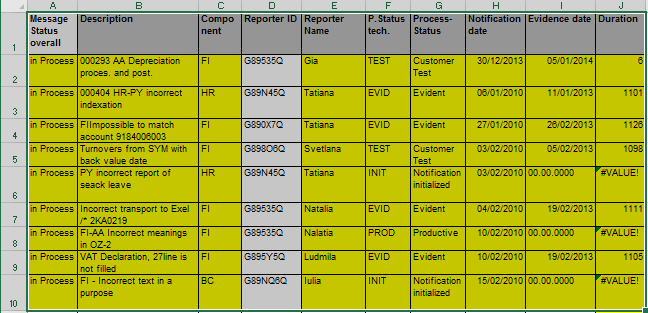
Select data with headers of the columns in the first row of your data range:
-
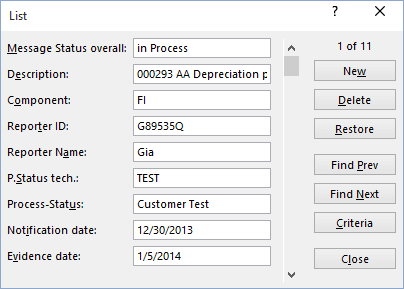
Click the Form… button on your own menu or in Quick Access toolbar. Excel displays a dialog box customized to your data:
Notes:
-
To move between the text boxes, press Tab.
-
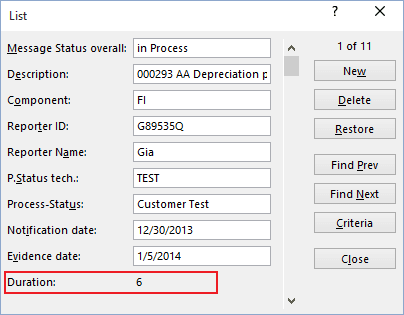
You can’t modify formulas using the data entry form – the formula result appears as text, not as an edit box:
-
To add new row to your table, click New button.
-
You can also use the form to edit the existing data.
Hope it is helpful for You_____________
Contact for any further queries:


MS Excel digits in words of PKR.
Start Microsoft Excel.
Press ALT+F11 to start the Visual Basic Editor.
On the Insert menu, click Module.
Type the following code into the module sheet.
 Option Explicit
 'Main Function
 Function SpellNumber(ByVal MyNumber)
 Dim Rupees, Paisas, Temp
 Dim DecimalPlace, Count
 ReDim Place(9) As String
 Place(2) = " Thousand "
 Place(3) = " Million "
 Place(4) = " Billion "
 Place(5) = " Trillion "
 ' String representation of amount.
 MyNumber = Trim(Str(MyNumber))
 ' Position of decimal place 0 if none.
 DecimalPlace = InStr(MyNumber, ".")
 ' Convert Paisas and set MyNumber to dollar amount.
 If DecimalPlace > 0 Then
 Paisas = GetTens(Left(Mid(MyNumber, DecimalPlace + 1) & _
 "00", 2))
 MyNumber = Trim(Left(MyNumber, DecimalPlace - 1))
 End If
 Count = 1
 Do While MyNumber <> ""
 Temp = GetHundreds(Right(MyNumber, 3))
 If Temp <> "" Then Rupees = Temp & Place(Count) & Rupees
 If Len(MyNumber) > 3 Then
 MyNumber = Left(MyNumber, Len(MyNumber) - 3)
 Else
 MyNumber = ""
 End If
 Count = Count + 1
 Loop
 Select Case Rupees
 Case ""
 Rupees = "No Rupees"
 Case "One"
 Rupees = "One Dollar"
 Case Else
 Rupees = Rupees & " Rupees"
 End Select
 Select Case Paisas
 Case ""
 Paisas = " and No Paisas"
 Case "One"
 Paisas = " and One Cent"
 Case Else
 Paisas = " and " & Paisas & " Paisas"
 End Select
 SpellNumber = Rupees & Paisas
 End Function

 ' Converts a number from 100-999 into text
 Function GetHundreds(ByVal MyNumber)
 Dim Result As String
 If Val(MyNumber) = 0 Then Exit Function
 MyNumber = Right("000" & MyNumber, 3)
 ' Convert the hundreds place.
 If Mid(MyNumber, 1, 1) <> "0" Then
 Result = GetDigit(Mid(MyNumber, 1, 1)) & " Hundred "
 End If
 ' Convert the tens and ones place.
 If Mid(MyNumber, 2, 1) <> "0" Then
 Result = Result & GetTens(Mid(MyNumber, 2))
 Else
 Result = Result & GetDigit(Mid(MyNumber, 3))
 End If
 GetHundreds = Result
 End Function

 ' Converts a number from 10 to 99 into text.
 Function GetTens(TensText)
 Dim Result As String
 Result = "" ' Null out the temporary function value.
 If Val(Left(TensText, 1)) = 1 Then ' If value between 10-19...
 Select Case Val(TensText)
 Case 10: Result = "Ten"
 Case 11: Result = "Eleven"
 Case 12: Result = "Twelve"
 Case 13: Result = "Thirteen"
 Case 14: Result = "Fourteen"
 Case 15: Result = "Fifteen"
 Case 16: Result = "Sixteen"
 Case 17: Result = "Seventeen"
 Case 18: Result = "Eighteen"
 Case 19: Result = "Nineteen"
 Case Else
 End Select
 Else ' If value between 20-99...
 Select Case Val(Left(TensText, 1))
 Case 2: Result = "Twenty "
 Case 3: Result = "Thirty "
 Case 4: Result = "Forty "
 Case 5: Result = "Fifty "
 Case 6: Result = "Sixty "
 Case 7: Result = "Seventy "
 Case 8: Result = "Eighty "
 Case 9: Result = "Ninety "
 Case Else
 End Select
 Result = Result & GetDigit _
 (Right(TensText, 1)) ' Retrieve ones place.
 End If
 GetTens = Result
 End Function

 ' Converts a number from 1 to 9 into text.
 Function GetDigit(Digit)
 Select Case Val(Digit)
 Case 1: GetDigit = "One"
 Case 2: GetDigit = "Two"
 Case 3: GetDigit = "Three"
 Case 4: GetDigit = "Four"
 Case 5: GetDigit = "Five"
 Case 6: GetDigit = "Six"
 Case 7: GetDigit = "Seven"
 Case 8: GetDigit = "Eight"
 Case 9: GetDigit = "Nine"
 Case Else: GetDigit = ""
 End Select
 End Function
Excel 2002 and Excel 2003
To use Insert Function, follow these steps:
Select the cell that you want.
Click Insert Function on the Standard toolbar.
Under Or select a category, click User Defined.
In the Select a function list, click SpellNumber, and then click OK.
Enter the number or cell reference that you want, and then click OK.
DOWNLOAD a sample Excel File
and ENJOY

 M. Adil Hussain
 Future Chartered Accountants